Open the Lisa voice agent on GitHub
Browse the hackathon repo with the Gemini Live session, Twilio bridge, claims playbook, eval transcripts, and the small review UI.
Open repositoryIntroduction
Last weekend I joined Big Berlin Hack and worked on Inca’s voice-agent challenge.
At a high level, the task was simple:
Build a phone-based insurance claims agent that can answer an inbound call, collect accident information, and feel human enough that callers do not immediately classify it as AI.
The agent we built was Lisa.
Lisa answers an insurance emergency hotline, asks what happened, checks whether the caller is safe, collects structured motor-claim details, and writes the result into a claim record.
We did not run a formal test for the original “more than 50% human votes” target, but we were able to demo the system successfully. The most convincing parts were not only model quality. Ambient office noise and the contrast between the first automated-sounding voice and Lisa’s later voice made the experience feel surprisingly real to most people who heard it.
This post is a short build log: what we built, what made the demo work, what was harder than expected, and what I learned about building voice agents quickly.
The Demo
The call flow is intentionally not exotic.
A caller reports a car accident. Lisa asks short follow-up questions. The system extracts the answers into a structured claim state.
That sounds like a normal form-filling problem until it happens through a live phone call. Then the product details start to matter: latency, interruptions, partial answers, one-question-at-a-time behavior, and structured output at the end.
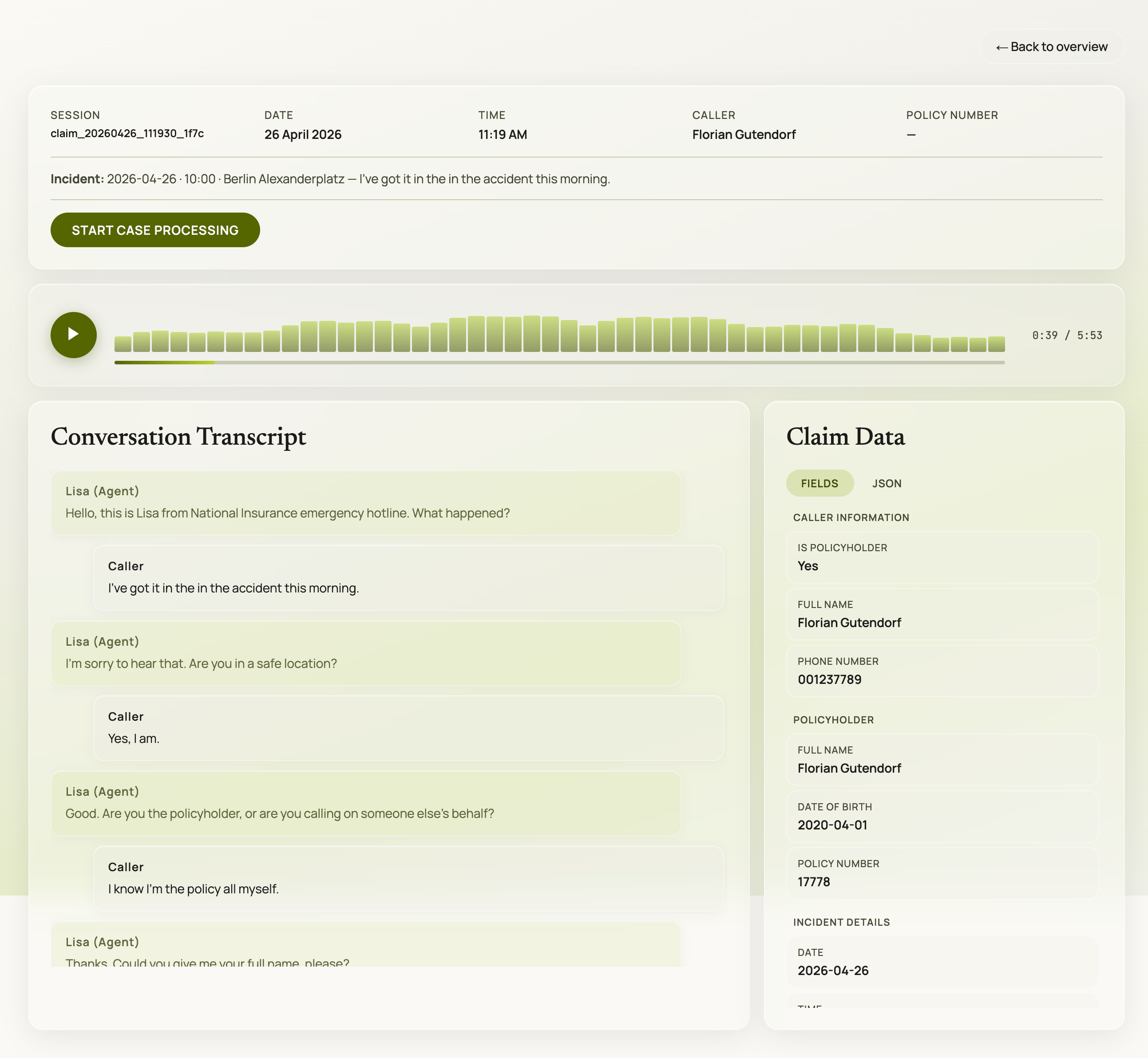
The review UI for the demo: live session data, extracted claim fields, and call artifacts written by the backend.
The Starting Point: A Voice Demo That Needed a Real Output
The easiest version of this project would have been a voice bot that sounds good for two minutes.
That was not enough for this challenge.
In an insurance context, the call itself is only one part of the product. The more important question is what happens after the call. Does the system produce a useful claim record? Can someone review what was collected? Is there a transcript, audio recording, and structured state?
That shaped the architecture from the beginning.
Lisa had three core parts:
- a real-time voice session using Gemini Live
- a phone transport using Twilio Media Streams
- a claims intake layer driven by a YAML playbook and structured state
Every call produced artifacts that could be inspected afterward:
- the call transcript
- the structured claim JSON
- the raw audio recording
- the extracted state shown in the review UI
That changed the project from “voice in, voice out” into something closer to a small claims-intake product.
The Key Technology Bet: Use a Live Voice Model
We picked Gemini Live because it gave us a lower-latency path than the classic speech-to-text, LLM, and text-to-speech pipeline.
For voice, latency is not a backend detail. It is part of the user experience.
If every answer has a long pause before it, the caller starts feeling the machinery. A live speech-to-speech model gave us turn detection, speech output, and barge-in behavior in one place. That mattered a lot in a hackathon setting because it removed several integration layers we would otherwise have had to build ourselves.
We did not spend much time comparing model options before building. During the hackathon we learned that there are also very fast NVIDIA voice models, so maybe another setup could have worked too. But for this weekend, Gemini Live was the fastest route from idea to a working phone demo.
The Human Effect Was a Product Decision
One of the most effective product decisions was not in the claims logic at all.
Before Lisa starts speaking, the call plays an automated-sounding opening sequence. That first voice is deliberately lower quality. When Lisa’s actual voice takes over afterward, it sounds better by comparison.
We also mixed ambient office noise under the agent’s speech. A perfectly clean AI voice can sound isolated and synthetic. A little background texture makes it feel more like a real phone environment.
This was one of the clearest lessons from the weekend:
Making a voice agent convincing is not only about the model. It is also about staging, contrast, timing, and audio environment.
The Hard Part Was Live Audio
The hardest engineering problem was bridging audio from Twilio into the model and back out again.
On paper, the architecture is straightforward:
Inbound phone call
  -> Twilio Media Streams
  -> FastAPI WebSocket bridge
  -> Gemini Live session
  -> audio response
  -> Twilio
  -> caller
In practice, every edge of that pipeline has opinions.
Twilio sends phone audio in a telephony format. Gemini expects a different audio shape. The app has to convert, resample, stream chunks, mix sounds, and send everything back without making the call feel broken.
This is where voice feels very different from chat. With text, a rough edge becomes an awkward sentence. With live voice, it becomes a pause, a cut-off response, clipping, or overlapping audio.
That was where a lot of the weekend went.
It was not enough to pass audio through technically. It had to pass through in a way that still felt like a conversation.
The Playbook Problem: Structure Without a Form
The next hard part was getting Lisa to follow the claims flow without sounding like a form.
The repo uses a declarative YAML playbook for the intake stages. The playbook defines what Lisa needs to collect and when a stage can be skipped. The prompt injects the current state, missing fields, and field expectations so the model knows what to ask next.
That structure helped a lot because it gave the agent a product spine:
opening situation
  -> safety check
  -> identification
  -> incident details
  -> driver details
  -> third-party details
  -> damage
  -> services
  -> documents
  -> phone number
  -> finalize
The hard part was balance.
If the prompt is too loose, Lisa drifts. She combines questions, skips required details, or answers things she should redirect. If the prompt is too strict, she sounds like she is reading a checklist.
A good voice agent needs behavior design: rules for urgency, safety, empathy, legal boundaries, unknown answers, abusive callers, and the end of the call.
The most useful pattern was to separate responsibilities:
- the playbook decides what must be collected
- the field expectations describe what counts as a complete answer
- the system prompt defines behavior and tone
- tool calls update the structured claim state
That made the flow easier to change quickly without losing control of the demo.
The Build Sequence: Keep the System Debuggable
The project was built in roughly 24 hours, so the whole weekend was a constant exercise in deciding what mattered now and what could wait.
The path that worked was building from a simple core outward:
- Start with text mode to prove the claims flow and state updates.
- Add local voice to test the live conversation.
- Add Twilio so the demo works through a real phone call.
- Add persistence, recordings, transcripts, and the review UI.
- Polish the audio experience enough that the demo feels real.
That sequence kept the system debuggable. If the claims flow fails in text mode, there is no point debugging phone audio. If local voice is broken, Twilio only adds more noise. If the state is not persisted, the demo may sound good but the product output is weak.
This is one of the bigger lessons I took from the project: voice agents are now easy enough to start, but still complex enough that you need a narrow path through the problem.
The Last-Minute Demo Reality
The final stretch was intense.
Getting the playbook right, tuning the prompt so Lisa followed the script, testing the phone flow, and cutting the demo video in the last minutes all happened under real hackathon pressure.
Under that pressure, the priority became very clear:
- Does the call start convincingly?
- Does Lisa respond quickly enough?
- Does she sound natural?
- Does she ask the right next question?
- Does the structured claim appear after the call?
- Can someone understand the product in one demo?
That last point matters more than it sounds. In a hackathon, you are not only building software. You are building the shortest possible path for someone else to understand why the software is interesting.
What I Learned
The biggest learning is that live voice agents are no longer as hard to start as they used to be.
A few years ago, this demo would have meant gluing together speech recognition, an LLM, text-to-speech, turn detection, interruption handling, and telephony infrastructure. Now a live model can collapse a lot of that into one session.
That does not make the product easy. It changes where the work moves.
The hard questions become more product-shaped:
- What should the agent do when the caller is unsafe?
- How short should responses be?
- When should the agent interrupt?
- Which details are mandatory and which can be marked unknown?
- How do you keep structured extraction reliable without making the conversation rigid?
- What audio details make the call feel natural?
That is a good shift.
Small teams can get to a real prototype faster, and then spend more time on the product behavior that actually matters.
Where This Leaves the Project
Lisa is still a hackathon project, not a finished insurance product. There is no real policy database, no production compliance layer, no insurer workflow integration, and no formal human-vs-AI benchmark.
But as a weekend build, it showed something useful: a small team can now build a phone-based voice agent that feels surprisingly real, collects structured data, and produces reviewable case artifacts.
For me, that is the interesting part.
The technology is becoming accessible. The differentiation will increasingly come from product judgment: flow, tone, guardrails, audio staging, and the connection back to a real operational workflow.