Introduction
This project is an experiment in building what Andrej Karpathy called an “LLM Knowledge Base”.
The starting idea is simple:
What happens if the LLM is not just the thing that answers questions, but the thing that maintains the knowledge base itself?
That is the framing I took from Karpathy’s post. Raw sources get collected locally as Markdown and images. The LLM turns them into summaries and concept pages. Obsidian becomes the frontend for browsing everything. Over time, the same setup can support Q&A, generated outputs, search, and maintenance workflows.
That is the workflow I am trying to build here for AI and ML topics.
What I like about this approach is that it stays local and inspectable. The whole thing is just Markdown, images, a repo, Obsidian, and an LLM workflow on top. The goal is not to build a polished product yet. The goal is to see whether this is a practical way to build and maintain a personal AI/ML wiki.
Project Snapshot
At a high level, this experiment currently combines six pieces:
- an ingest flow that clips AI/ML web articles into local Markdown with images
- a cleanup step that fixes broken local image references so the raw source remains readable in Obsidian
- a Claude Code skill that processes new articles into summaries and folds them into a growing wiki
- a lightweight semantic search engine over the vault with a small web UI and direct Obsidian deep links
- a compact QA index that lets the LLM navigate the processed sources without needing retrieval infrastructure first
- a discovery loop where Perplexity scans the wiki for issues, missing topics, and strong related sources to ingest next
The current system is still small, but the core loop already exists. There is a raw article layer, a summary layer, and a concept wiki that groups material into areas like training, evaluation, inference, architecture, and applications.
Open the AI/ML knowledge base on GitHub
Browse the raw articles, generated summaries, Claude skill, and concept wiki structure directly in the repository.
Open repositoryWhy This Experiment Exists
I have been collecting technical material for a while, but the usual problem with that habit is obvious: collecting articles is easy, turning them into a usable system is not.
A folder of saved links or clipped markdown can be useful for a while, but it does not automatically become a knowledge base. It only becomes one if the material is summarized, cross-linked, grouped into concepts, and kept in a form that is easy to revisit later.
That is the part of Karpathy’s framing I found most compelling. The LLM is not only there for question answering. It is there to do the maintenance work that usually never happens consistently: summarizing, linking, updating concept pages, and gradually turning a pile of source material into something more structured.
So this project is less about building a chatbot over documents and more about building a workflow that compiles raw reading material into a wiki.
What I Built So Far
So far, I have mainly built the first version of that workflow.
Ingest Layer
I set up article ingest with MarkSnip. That gives me local Markdown copies of web articles together with their downloaded images.
That matters because I want the source material to stay local, browsable in Obsidian, and easy for the LLM to inspect directly. I do not want the workflow to depend on a live website still being available later.
Cleanup Layer
After clipping, local image references are often broken because the paths are URL-encoded in a messy way. To fix that, I wrote a small Python script that rewrites those references to the correct local files.
This is a small part of the system, but it is an important one. If the raw source layer is annoying to use, the whole workflow breaks down very quickly. Fixing the article render quality keeps the input layer usable.
Processing Layer
The main piece so far is a Claude Code skill for processing new articles.
The intended flow is simple:
- fix local image references if needed
- generate a summary of the article
- incorporate the article into the wiki by updating or expanding the relevant concept pages
- add or update the article entry in the QA index
That is the part I care about most. I do not just want a folder of saved articles. I want a repeatable process where new sources gradually get compiled into a more structured wiki.
Search Layer
I also extended the project with a rough search engine over the wiki.
The goal here was not to build heavy retrieval infrastructure. I wanted something lightweight, local, and inspectable that makes the existing vault easier to navigate for both me and the LLM.
For embeddings, I chose all-MiniLM-L6-v2. I preferred it over raw BERT because raw BERT CLS embeddings are not good semantic retrieval embeddings. all-MiniLM-L6-v2 is a distilled BERT model fine-tuned with the Sentence-BERT setup specifically for semantic similarity, so it is much better suited to this job. It is also very cheap to run: about 22M parameters, small enough to run comfortably on CPU, and roughly 80MB in size. At the current scale of the vault, that speed and simplicity matter more than squeezing out a bit more quality from a larger model.
For storage, I used SQLite with sqlite-vec. I like this setup because it keeps everything in one local file, with no separate service to run and no hidden vector store. The embeddings live alongside the metadata, and the schema includes file modification times so re-indexing can stay incremental. Only files that changed since the last run need to be embedded again.
I also built a small web UI on top instead of stopping at a terminal tool. The main reason is usability: search-as-you-type is much nicer in a browser than in a CLI for this kind of task. Each result also uses Obsidian deep links via the obsidian://open URI scheme, so clicking a match opens the exact file directly in the desktop vault without needing an extra plugin.
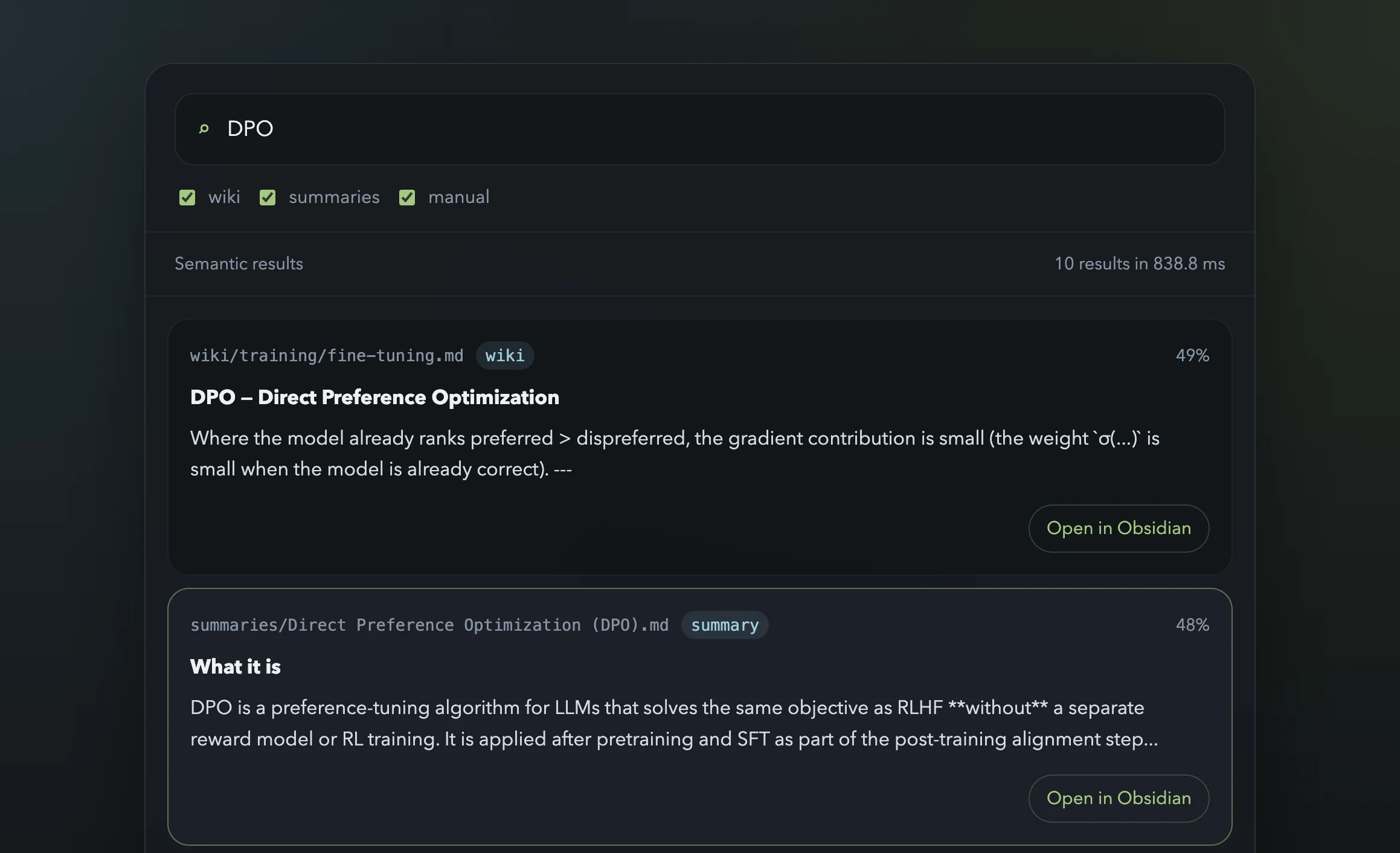
Current search UI over the vault, combining semantic ranking with direct open-in-Obsidian links.
QA Index Layer
After building the semantic search app, the next step was enabling context-only Q&A without having to rely on retrieval infrastructure for every question.
The solution was a master index at knowledge-base/qa-index.md with one compact entry per processed source. Each entry contains a file pointer, the source type, topic tags, and a short description that names the specific technique, claim, or finding in the document. At the current scale, the whole file is compact enough to fit into a single LLM context window, which makes it useful as a first navigation layer before deeper reading.
To keep the index up to date automatically, I added a new step to the /process-article skill. After updating the wiki, the skill now also creates or updates the QA index entry for that source. The rules are intentionally simple: one entry per source, under 100 words, and topic tags aligned with the wiki taxonomy. If the file does not exist yet, the workflow creates it. If the source was already processed earlier, it updates the existing entry instead of duplicating it.
I then bootstrapped the index by reading all existing summaries and writing one entry for each source in a single pass. That gave the project a compact overview layer that sits between the raw wiki and the more flexible semantic search tool.
Discovery Layer
Once the basic wiki existed, I started using Perplexity as a kind of external reviewer for the vault.
I would give it access to the wiki and ask it to scan for obvious issues, missing topic areas, and places where the concept coverage was still thin or uneven.
That turned out to be useful because the problem is not only processing articles I already saved. The problem is also deciding what the wiki should learn next.
I also used it as a recommendation engine constrained by my taste. Instead of asking for generic AI reading lists, I pointed it at authors and sources I already found valuable and asked for adjacent authors, similar articles, and similarly high-quality material.
That gave me a better way to extend the knowledge base. The wiki itself became part of the prompt for deciding what to ingest next, and Perplexity became a tool for spotting blind spots and surfacing good follow-on sources.
Next Steps
The next steps are mostly about making the wiki easier for the LLM to use and easier to grow:
- keep growing the wiki with more source articles
- improve the search and retrieval layer as the vault grows
- add linting and health checks
- build a process that incorporates the output of my own queries back into the wiki
That last point is especially important to me. I want a harness that forces the LLM to answer by writing a Markdown file into an output/ folder, with references back to existing articles or wiki pages. Then I want a second process that takes those outputs and folds the useful parts back into the wiki itself.
If that works well, then my own queries and explorations start compounding inside the knowledge base instead of disappearing into chat history.
Current State
Right now this is still a small system, but the basic loop exists: ingest articles, clean them up, summarize them, compile them into a wiki, maintain a compact QA index, search across the vault through a lightweight local interface, and use the wiki itself to drive discovery of what to add next.
That is enough to make the project interesting already. The next question is whether I can grow the wiki far enough, and tighten the workflows enough, that the LLM can use it not just as a pile of notes but as a real working knowledge base.
AI/ML Knowledge Base Series
- Part 1: Building an LLM-Maintained AI/ML Knowledge Base
- Part 2: Using My Knowledge Base to Build a Harness Engineering Podcast
- Part 3: Getting Books into My AI/ML Knowledge Base